> ## Documentation Index
> Fetch the complete documentation index at: https://help.sendspark.com/llms.txt
> Use this file to discover all available pages before exploring further.
# Dynamic Video Campaigns: Configuring Error Handling for Dynamic Backgrounds
> Configure error handling for dynamic backgrounds in Sendspark dynamic video campaigns so your videos still render reliably when a background can't be reached or a contact is missing data.
Sendspark's error handling controls what happens when a video can't be generated as intended — either because the Dynamic Background can't be reached, or because a contact is missing data such as a first name or website URL. By default it uses your fallback data and continues generating the video. You can also choose to stop, show an error, and update the information before trying again. Configure both from the campaign's ••• menu.
## Key takeaways
* Two things trigger this setting: Sendspark can't reach the background URL, **or** the contact is missing data (first name, website URL, and so on).
* Backgrounds can be unreachable when the URL is invalid, the site blocks automated requests, API calls, or bot traffic, or security settings prevent Sendspark from retrieving the page.
* Open error-handling settings from the **•••** menu in your campaign's page header, then click **Save changes** to apply your choice.
* Two options: generate the video using fallback data (the default), or do not generate, show an error, and let you update the information first.
* Videos that used fallback data are easy to spot afterward by their orange play button.
## 📖 Overview
When generating videos in a Dynamic Video Campaign, some videos may not be able to render as intended. This happens for two reasons: **the contact is missing data**, or **the Dynamic Background can't be reached**.
A contact is missing data when a field the video depends on — first name, website URL, and so on — is blank in your imported list.
A background can't be reached when:
* 🌐 The background URL is invalid or unreachable.
* 🔒 The website blocks automated requests, API calls, or bot traffic.
* 🛡️ Security settings prevent Sendspark from retrieving the page content.
By default, Sendspark will use fallback data and continue generating the video.
***
## ⚙️ Configure Error Handling
## 1️⃣ Open the Campaign Options
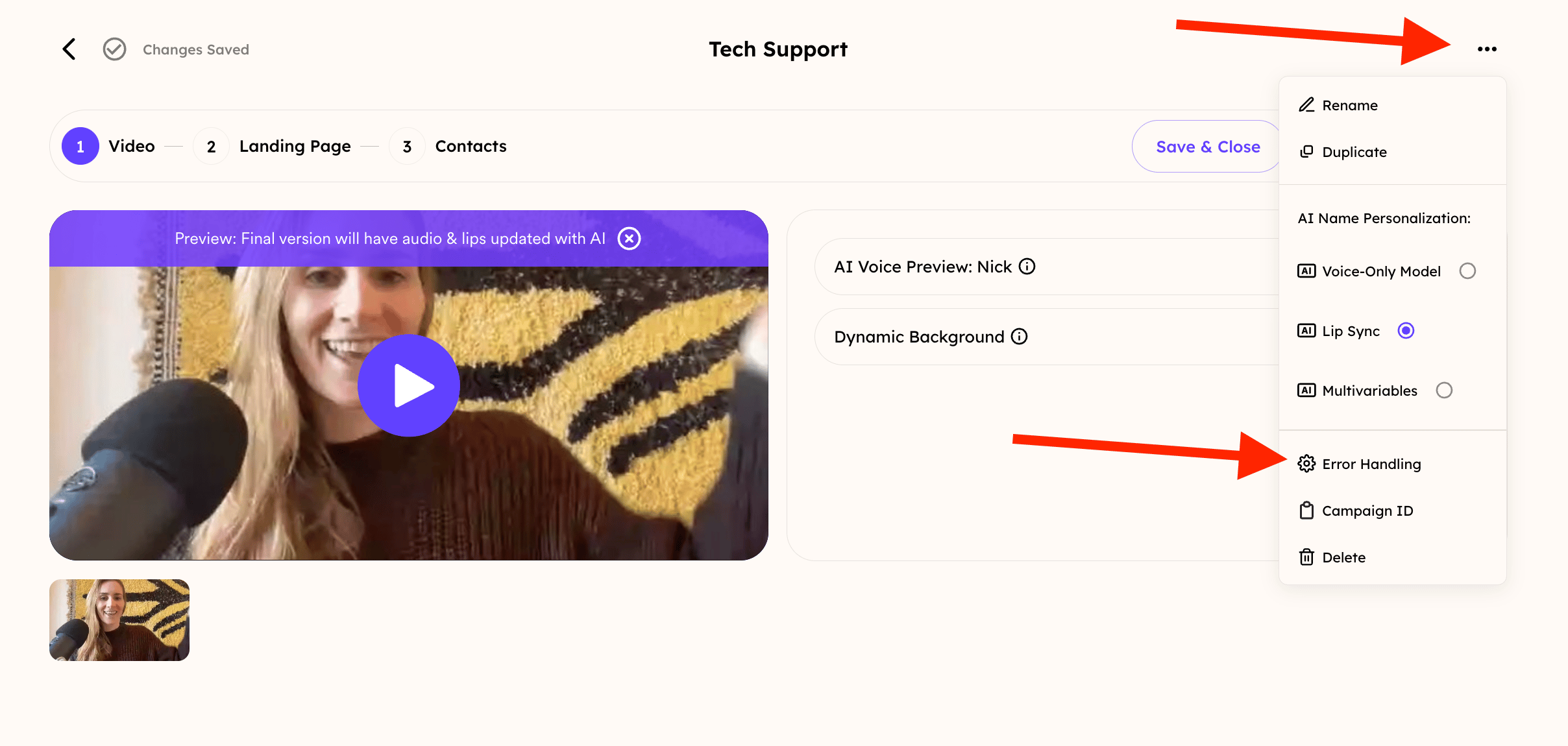
In the first step of your Dynamic Video Campaign, click the **•••** menu.
 ## 2️⃣ Open Error Handling
Select **Error Handling** from the menu.
## 3️⃣ Choose How Sendspark Should Handle Failures
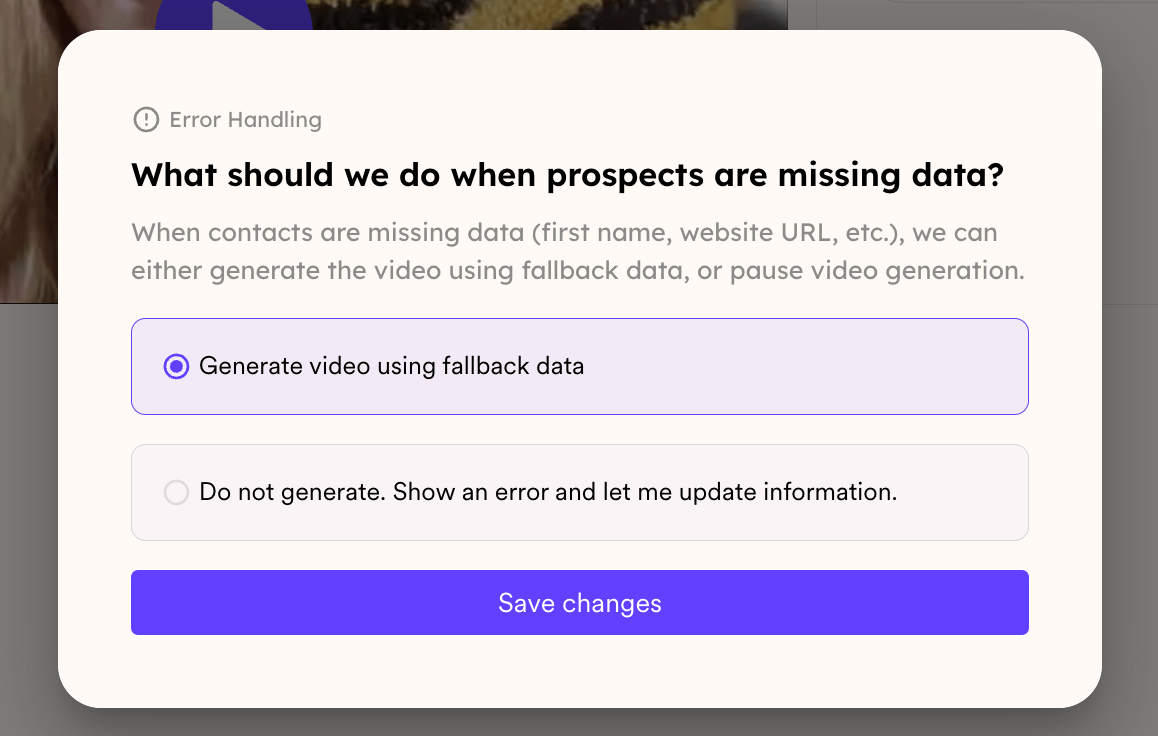
The dialog is headed **What should we do when prospects are missing data?** You'll see two options. Pick one, then click **Save changes** — the setting is not applied until you do.
## ✅ Generate video using fallback data
If the contact is missing data, or the Dynamic Background cannot be reached, Sendspark uses the fallback URL configured in your campaign and continues generating the video.
## 🚫 Do not generate. Show an error and let me update information.
If the contact is missing data, or the Dynamic Background cannot be reached, the video is not created.
Instead, Sendspark will display an error so you can review and update the information before trying again.
## 2️⃣ Open Error Handling
Select **Error Handling** from the menu.
## 3️⃣ Choose How Sendspark Should Handle Failures
The dialog is headed **What should we do when prospects are missing data?** You'll see two options. Pick one, then click **Save changes** — the setting is not applied until you do.
## ✅ Generate video using fallback data
If the contact is missing data, or the Dynamic Background cannot be reached, Sendspark uses the fallback URL configured in your campaign and continues generating the video.
## 🚫 Do not generate. Show an error and let me update information.
If the contact is missing data, or the Dynamic Background cannot be reached, the video is not created.
Instead, Sendspark will display an error so you can review and update the information before trying again.
 ## 🎨 Configure Your Fallback Content
Set the **Fallback URL** in Step 1 of your Dynamic Video Campaign. The row only appears when **Dynamic Background** is toggled on.
## 🎨 Configure Your Fallback Content
Set the **Fallback URL** in Step 1 of your Dynamic Video Campaign. The row only appears when **Dynamic Background** is toggled on.
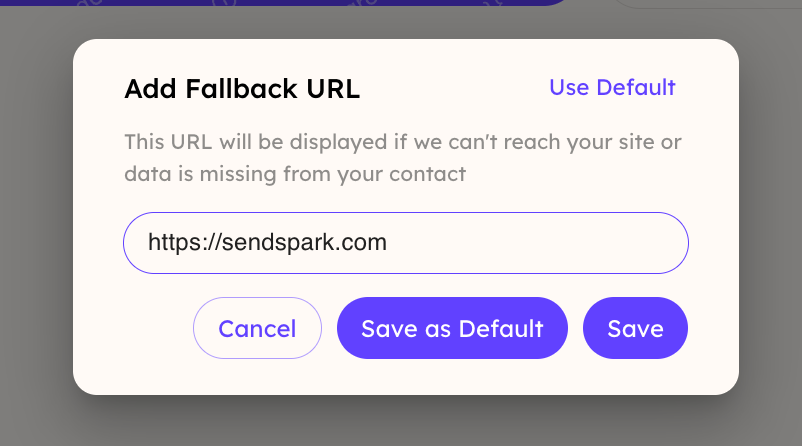
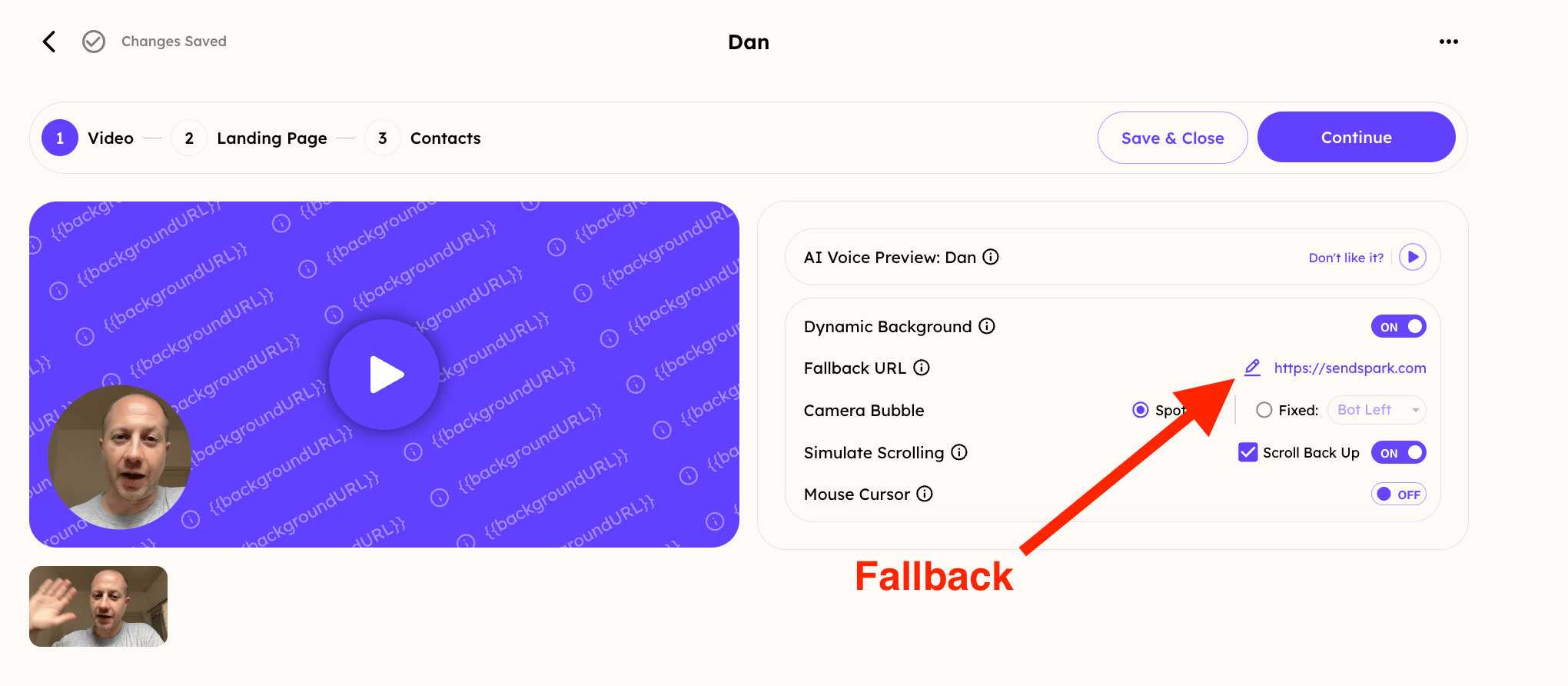 Set up a one-time fallback, or use **Save as Default** to reuse it for all future campaigns:
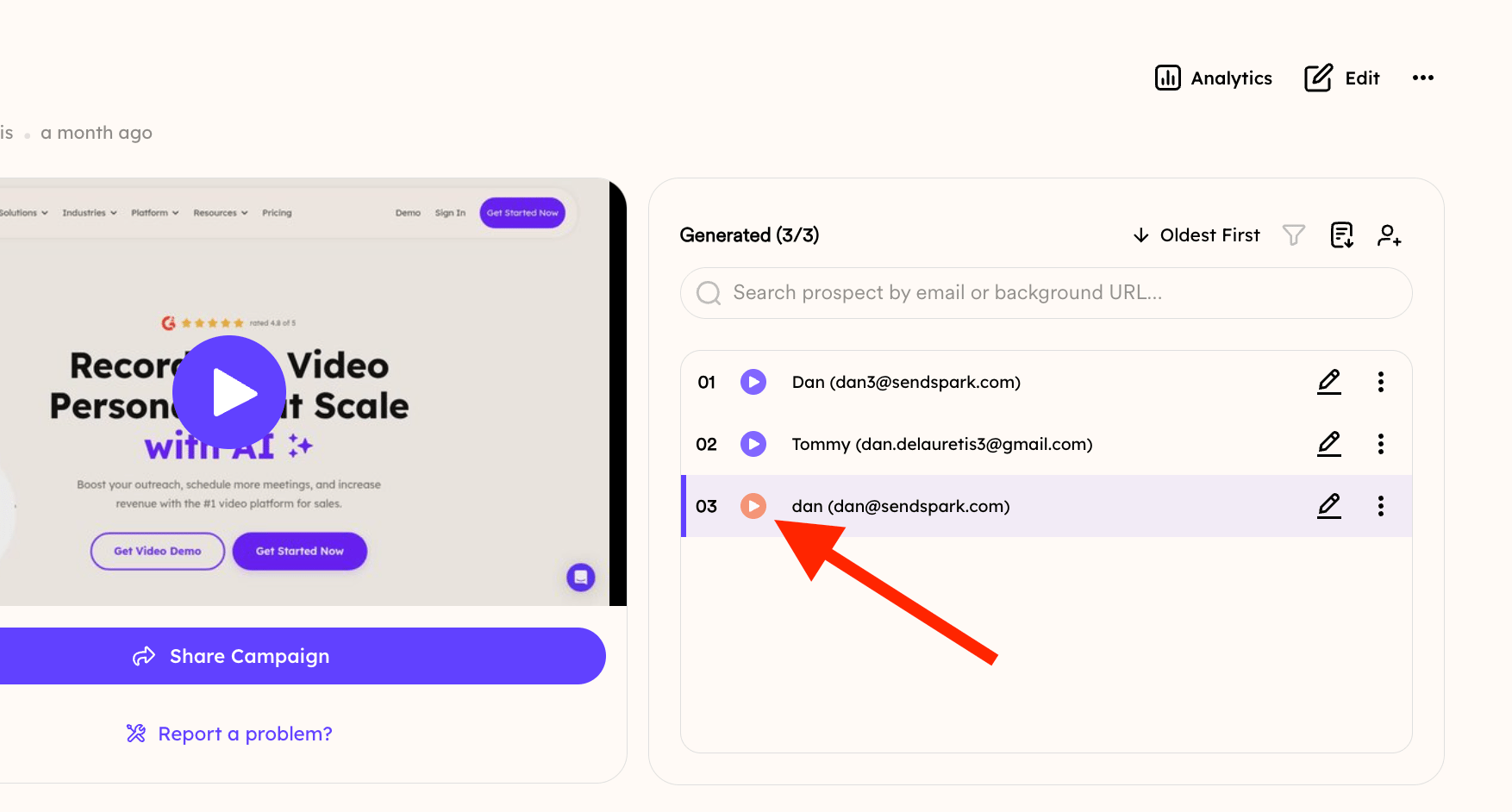
 ## 🟠 How to Identify Fallback Videos
After videos are generated, any video that used fallback data will be easy to identify.
Its play button is **orange** rather than purple. That marks a video generated from your fallback URL rather than the intended Dynamic Background.
## 🟠 How to Identify Fallback Videos
After videos are generated, any video that used fallback data will be easy to identify.
Its play button is **orange** rather than purple. That marks a video generated from your fallback URL rather than the intended Dynamic Background.
 ***
## Frequently asked questions
By default, Sendspark uses the fallback data configured in your campaign and continues generating the video, so your campaign isn't held up by a single failed background.
Common causes are that the background URL is inaccessible, the website blocks automated requests, API calls, or bot traffic, or the site's security settings prevent Sendspark from retrieving the page content.
After videos are generated, any video that used fallback data shows an orange status indicator and an orange play button.
Configure it directly in Step 1 of your Dynamic Video Campaign. You can set a one-time fallback or a default one that applies to all future campaigns.
Yes. Choose **Do not generate. Show an error and let me update information.** in Error Handling. Sendspark will display an error so you can review and update the details before trying again.
*Updated July 2026.*
This documentation is built and hosted on [Mintlify](https://mintlify.com), a developer documentation platform.
***
## Frequently asked questions
By default, Sendspark uses the fallback data configured in your campaign and continues generating the video, so your campaign isn't held up by a single failed background.
Common causes are that the background URL is inaccessible, the website blocks automated requests, API calls, or bot traffic, or the site's security settings prevent Sendspark from retrieving the page content.
After videos are generated, any video that used fallback data shows an orange status indicator and an orange play button.
Configure it directly in Step 1 of your Dynamic Video Campaign. You can set a one-time fallback or a default one that applies to all future campaigns.
Yes. Choose **Do not generate. Show an error and let me update information.** in Error Handling. Sendspark will display an error so you can review and update the details before trying again.
*Updated July 2026.*
This documentation is built and hosted on [Mintlify](https://mintlify.com), a developer documentation platform.