> ## Documentation Index
> Fetch the complete documentation index at: https://help.sendspark.com/llms.txt
> Use this file to discover all available pages before exploring further.
# Why Your Card Doesn’t Support This Payment
> Learn how to fix card payment failures due to Indian RBI regulations and 3D Secure restrictions with manual invoice payment solutions.
If your card shows "doesn't support this payment," it's usually an Indian bank enforcing RBI rules that require 3D Secure (OTP) approval for each charge. The initial purchase works because it includes OTP, but recurring charges don't trigger OTP, so the bank blocks them. This is a bank-level restriction. The fix is to pay the invoice manually, where OTP authentication is supported.
## Key takeaways
* Cause: RBI regulations require 3D Secure (OTP) authentication and manual approval; recurring charges don't trigger OTP, so Indian banks block them automatically.
* It's most common when the merchant is outside India, an international provider processes the charge, or the payment is recurring or automatic.
* This is a bank-level restriction that Sendspark cannot override.
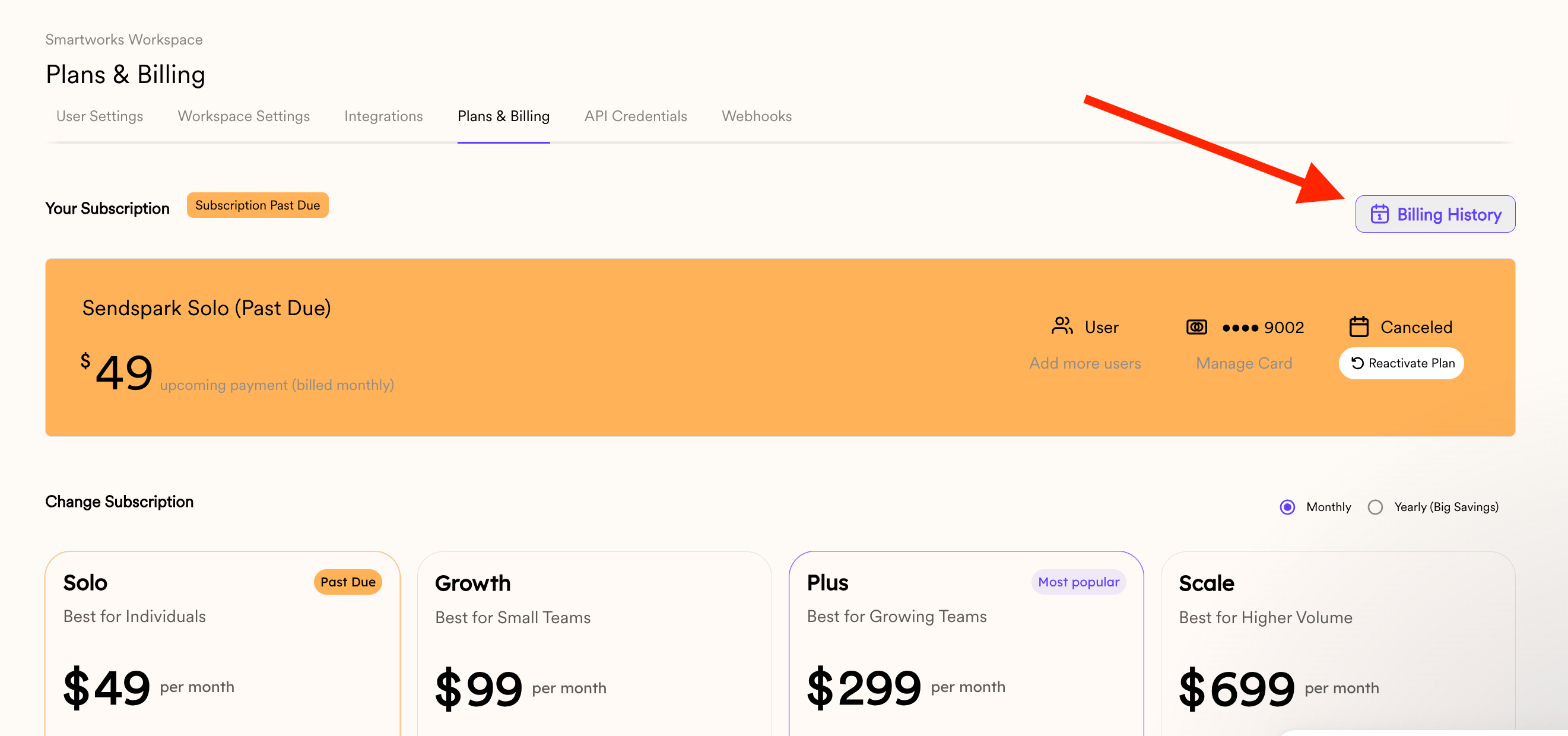
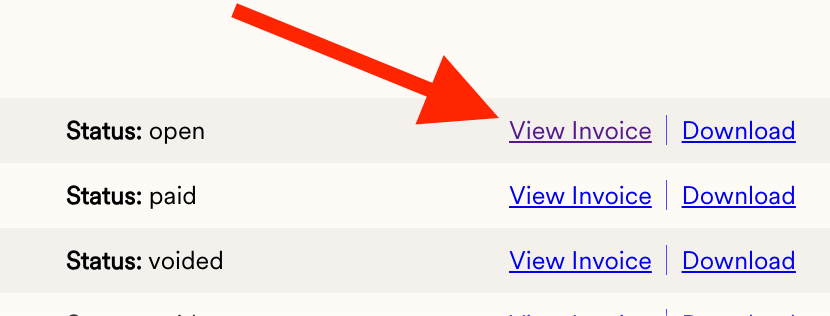
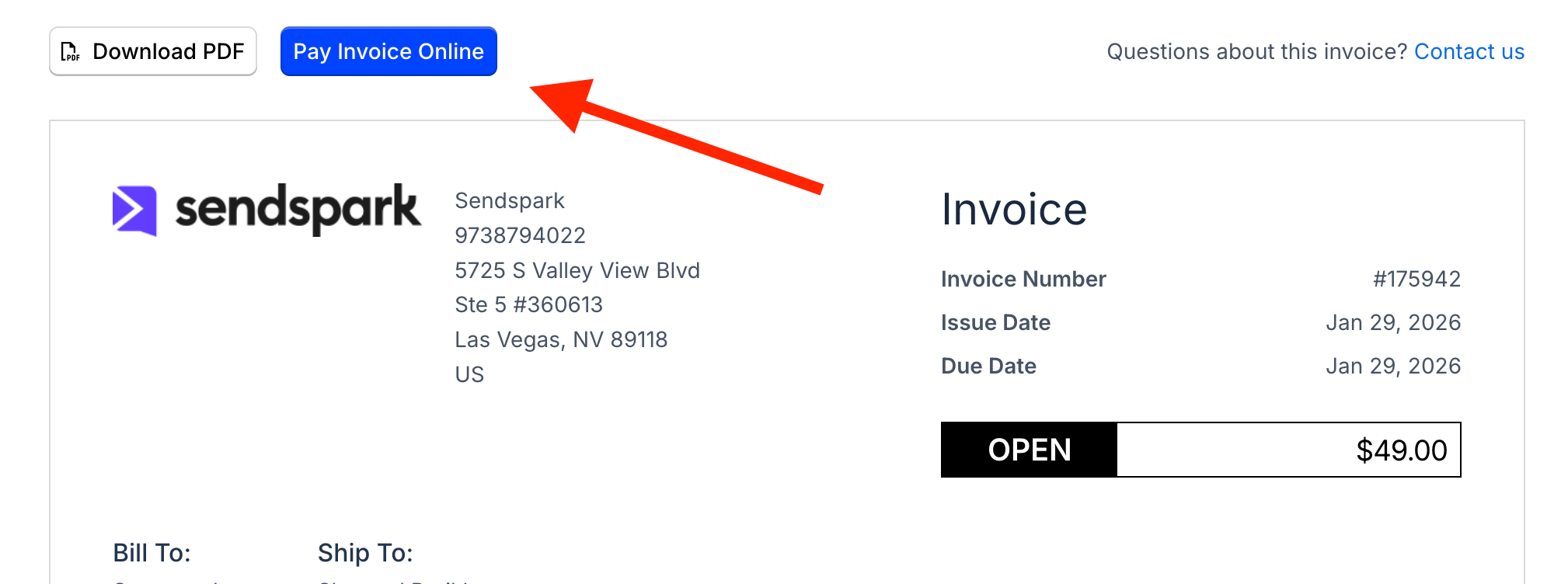
* Workaround: pay the open invoice manually (**Plans & Billing → Billing History → View Invoice → Pay Invoice Online**), which is treated as a one-time payment, so OTP is requested and allowed.
## The Root Cause: 3D Secure (OTP) & Recurring Payments in India
Most credit and debit cards issued by **Indian banks** are subject to **RBI (Reserve Bank of India) regulations**, which require:
* **3D Secure authentication (OTP)** for online payments
* **Manual customer approval** for each transaction
Because of this, many Indian cards **cannot complete automatic or recurring payments**, especially when:
* The merchant is **outside India**
* The payment is processed by an **international payment provider**
* The charge is **recurring or automatic** (subscriptions, renewals, retries)
## Why it worked once but not again
* The **initial purchase** often succeeds because it includes OTP authentication.
* **Recurring charges do not trigger OTP**, so the bank blocks them automatically.
* When the renewal runs, the bank rejects it with errors like:
* “Card doesn’t support this payment”
* “Authentication required”
* “Recurring payment not allowed”
This is a **bank-level restriction**, not something we can override.
## ✅ The Solution: Pay the Invoice Manually
The most reliable workaround is to **pay the invoice manually**, where OTP authentication *is* supported.
## How to Pay Your Invoice Manually
1. Log in to your account
2. Open **Plans & Billing** from your account settings
3. Click **Billing History**
4. Find the invoice with the status **open**, and click its **View Invoice** link
5. Click **Pay Invoice Online**
6. Complete the payment (OTP will be requested by your bank)
This process works because:
* It’s treated as a **one-time payment**
* OTP authentication is allowed
* You remain in full control of the transaction
***
Open your account and click on SEE PLANS
 Head to BILLING HISTORY:
 Click the **View Invoice** link on the row whose status reads **open**:
 Use the PAY INVOICE ONLINE option
 ***
## Frequently asked questions
The initial purchase often succeeds because it includes OTP authentication. Recurring charges don't trigger OTP, so your bank blocks them automatically under RBI rules — you may see errors like "Card doesn't support this payment," "Authentication required," or "Recurring payment not allowed."
No. This is a bank-level restriction driven by RBI (Reserve Bank of India) regulations, not something Sendspark can override.
Log in to your account, open **Plans & Billing**, click **Billing History**, find the invoice whose status reads **open**, click **View Invoice**, then **Pay Invoice Online** and complete the payment. Your bank will request OTP, which is supported for one-time payments.
A manual invoice payment is treated as a one-time payment, where OTP authentication is allowed and you stay in full control of the transaction — so it isn't blocked the way an automatic recurring charge is.
*Updated July 2026.*
This documentation is built and hosted on [Mintlify](https://mintlify.com), a developer documentation platform.
***
## Frequently asked questions
The initial purchase often succeeds because it includes OTP authentication. Recurring charges don't trigger OTP, so your bank blocks them automatically under RBI rules — you may see errors like "Card doesn't support this payment," "Authentication required," or "Recurring payment not allowed."
No. This is a bank-level restriction driven by RBI (Reserve Bank of India) regulations, not something Sendspark can override.
Log in to your account, open **Plans & Billing**, click **Billing History**, find the invoice whose status reads **open**, click **View Invoice**, then **Pay Invoice Online** and complete the payment. Your bank will request OTP, which is supported for one-time payments.
A manual invoice payment is treated as a one-time payment, where OTP authentication is allowed and you stay in full control of the transaction — so it isn't blocked the way an automatic recurring charge is.
*Updated July 2026.*
This documentation is built and hosted on [Mintlify](https://mintlify.com), a developer documentation platform.